
AI used to feel like something only big tech companies could afford. Today a small business can add useful AI features to its website for a few dollars a month, or for free. An assistant that answers questions at midnight, search that understands what people mean, product suggestions that lift order value. The trick is choosing the few that pay for themselves.
This guide, updated for 2026, shows where AI helps most, which affordable tools to start with and how to add them without a big custom build. You can also try a working example right on this page.
Where AI features help a business website most

Start with the jobs your team repeats every day, or the questions customers ask again and again. These five areas give most small businesses the quickest return.
- A virtual assistant for customer questions Answers the common questions instantly, day or night, and passes real leads to your team.
- Product recommendations Suggests related products on WooCommerce and Shopify stores, so customers find more of what they want.
- Search that understands meaning Finds the right page or product even when visitors use different words than you do.
- Content and SEO help Drafts titles, meta descriptions and product copy for a person to review and publish.
- Faster images and better accessibility Compresses images automatically and suggests alt text, which helps both speed and search.
Pick one or two. Adding everything at once makes a site slower and harder to manage, and makes it impossible to tell what is working.
See an AI assistant at work on this page
The best way to judge an AI assistant is to use one. Ella, the virtual assistant on this website, was built by WebCrafters and answers from our own pages, the same way a chatbot we build for you would answer from yours.
Do you build online stores, and how long does it take?
Yes. WebCrafters builds WooCommerce stores for Canadian businesses. A typical store takes 4 to 8 weeks from the approved quote. Would you like to plan your store with me?
Sure.
What Ella does here
- Answers questions about our services from our own pages
- Turns a few multiple-choice answers into a website plan
- Sends that plan to a project lead for a written quote
- Is available any time, and hands over to a person when needed
If you want something similar for your business, an assistant like Ella is one of the AI solutions we build, connected to your own content and the tools you already use.
Free and affordable AI tools to start with

Most of these have a free plan or a low monthly price, so you can try one before you commit.
Chat and customer support
Content and SEO
Images and speed
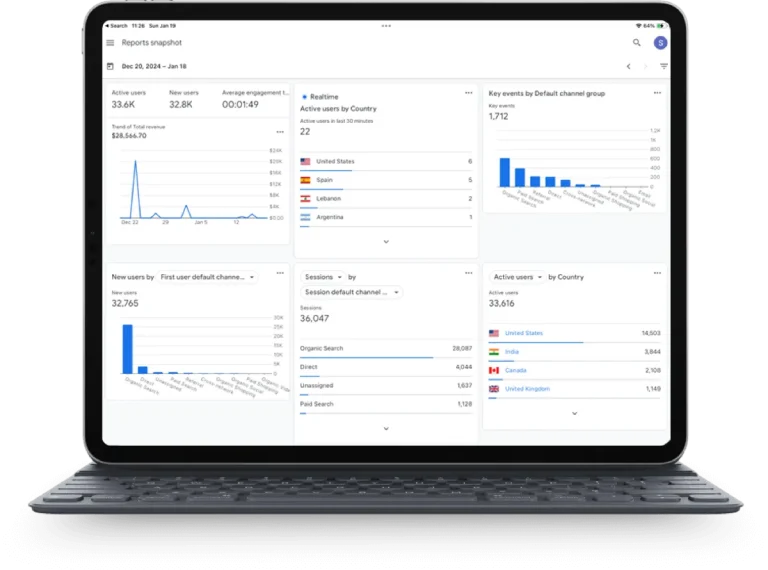
Analytics
Use AI services instead of building from scratch

Training your own AI model is expensive and rarely needed. Large cloud providers offer ready-made AI services that your website can call when it needs them, and you pay only for what you use.
- Language models Write, summarize, answer questions and pull details out of text. This is what powers most website assistants.
- Google Vertex AI Image recognition, translation and sentiment analysis, with a free trial credit.
- Microsoft Azure AI Translation, speech, document reading and search, with free monthly limits on many services.
A developer connects these to your site in days rather than months, and you can switch providers later without rebuilding everything.
Fit AI into the platform you already use
- WordPress Plugins such as AI Engine add a chatbot or content tools, and Yoast or Rank Math handle SEO suggestions.
- WooCommerce and Shopify Recommendation and chat apps install from the app store, and Shopify Magic writes product descriptions. Klaviyo adds AI-based email segments.
- Custom web apps Laravel Scout with Meilisearch gives an app fast search that understands meaning, and AI services connect through a simple API.
Start small, measure, then grow

- Launch one feature A virtual assistant is usually the best first step, because you will see results within weeks.
- Measure what changes Watch enquiries, support emails, time on site and sales before and after.
- Test against the old way Try two versions with a tool such as VWO to see which one converts better.
- Keep what works Add the next feature only once the first one has paid for itself.
Make your website AI-ready in 2026
You do not need a Silicon Valley budget for a smart website. One well-chosen AI feature, built on your own content and measured properly, can save hours every week and turn more visitors into enquiries. If you want to see what that looks like, ask Ella a question about your business.
Questions about AI features for websites
For most businesses, start with a virtual assistant such as Tidio or Chatbase, an SEO plugin with AI help such as Yoast SEO, and automatic image compression such as Imagify. Together they cover customer questions, search visibility and speed.
Yes. Many AI tools have free plans or low monthly prices, and cloud AI services charge only for what you use. Starting with one feature keeps the cost small while you see what works.
AI can draft titles and meta descriptions, suggest topics your page is missing and speed up your site by compressing images. A person should still review everything before it is published.
Not for the basics. WordPress plugins and Shopify apps add most AI features without code. A custom assistant that answers from your own content, or connects to your CRM, needs a developer.
Yes. Ella, the virtual assistant on this website, is built by WebCrafters. Ask Ella a question to see how an assistant built on your own content would work for your customers.
Thinking about AI on your website?
Add AI features that pay for themselves
We add practical AI to business websites, from virtual assistants that answer customer questions to smart search and automated replies. Tell us what you want to save time on and we will suggest a starting point and send a written quote.